Welcome!
-
-
-
-
-
-
-
- LMS Home
- Core Concepts
- Companies and Departments
- Courses
- Course Status and Visibility
- Sections
- Video Activities
- Reading Activities
- Document Activities
- Enrolling People in a Course
- Bulk Enroll With CSV
- Roles in a Course
- How Progress Is Tracked
- Course Reports
- Knowledge Base Overview
- Libraries and Folders
- Uploading Content Items
- Library Visibility
- AI Agent per Library
- My Courses
- Platform People
-
-
-
-
- Project Structure Template
- Table of Contents (TOC)
- Content Folder
- Introduction to Markdown
- Markdown Basics
- Markdown Lists
- Markdown Links
- Markdown Images
- Markdown Code
- Markdown Tables
- Markdown Equations
- Markdown Videos
- Markdown Embedded HTML
- VS Code Snippets
- Introduction to Styles
- Custom Theme
- Framed Narrations
- Markdown Configuration
- Editor Setup
-
The three planes
TL;DR; Knowledge Base, Learn, and Create are three views onto one system — capture in one place, and it's what people are taught from and what Ask Lupo answers from.
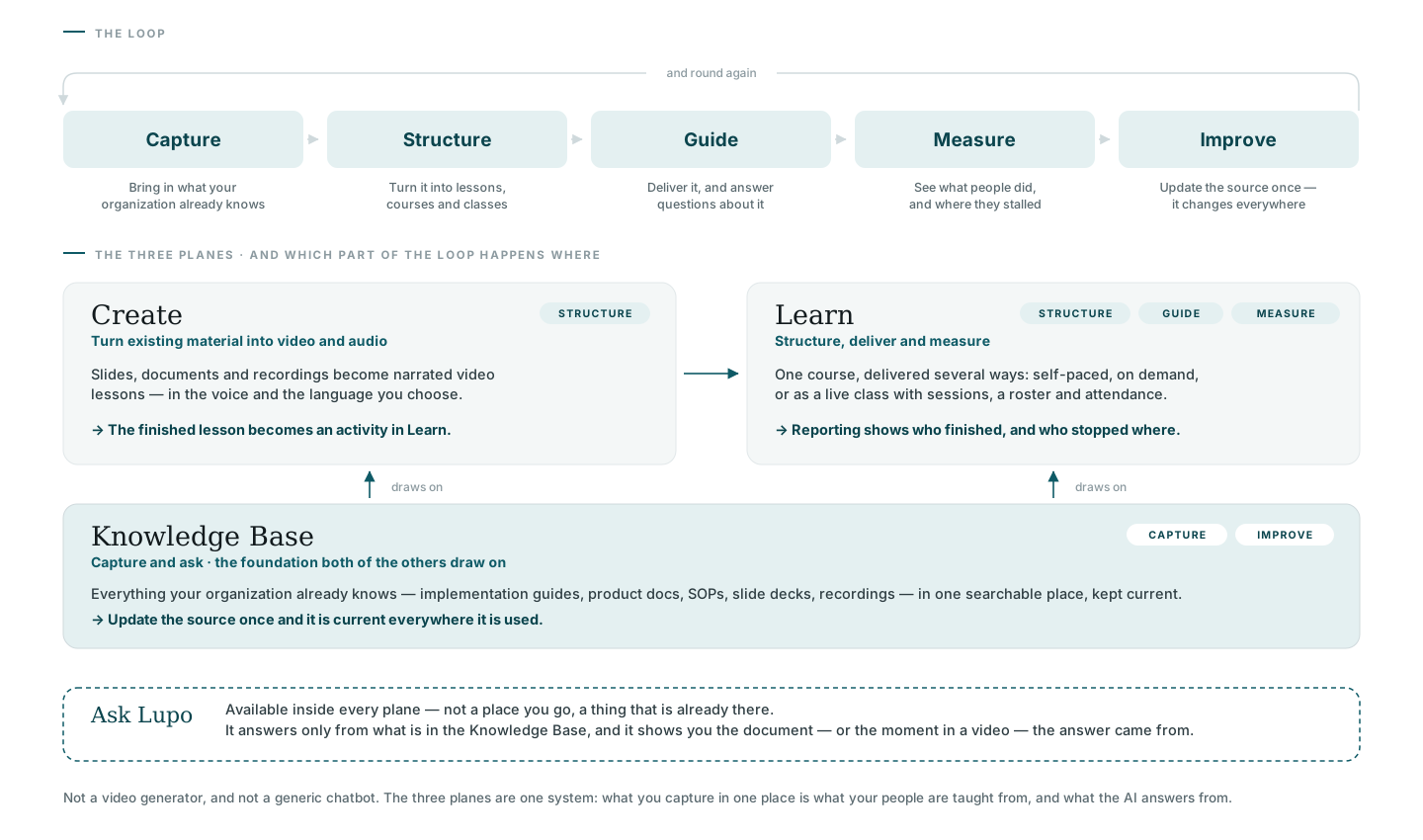
Knowledge Base — capture and ask
The foundation the other two planes draw on. Everything your organization already knows — implementation guides, product docs, SOPs, slide decks, recordings — lives here in one searchable place. Update the source once and it's current everywhere it's used.
Create — turn material into video
Slides, documents, and recordings become narrated video lessons, in the voice and language you choose. A finished lesson becomes an activity in Learn.
Learn — structure, deliver, and measure
One course, delivered several ways: self-paced, on demand, or as a live class with sessions, a roster, and attendance. Reporting shows who finished, and where they stopped.
Ask Lupo — inside all three
Ask Lupo isn't a place you go — it's already there, inside every plane. It answers only from what's in the Knowledge Base, and shows you the document, or the moment in a video, the answer came from.
Where to go next
- What Lupo is — the category and the loop these three planes belong to.
- Concepts and glossary — every term used across this documentation.