Welcome!
-
-
- Learn Home
- Core Concepts
- Companies and Departments
- Courses
- Course Status and Visibility
- Modules
- Video Activities
- Reading Activities
- Document Activities
- Enrolling People in a Course
- Bulk Enroll With CSV
- Roles in a Course
- How Progress Is Tracked
- Course Reports
- Knowledge Base Overview
- Libraries and Folders
- Uploading Content Items
- Library Visibility
- AI Agent per Library
- My Courses
- Platform People
-
- Project Structure Template
- Table of Contents (TOC)
- Content Folder
- Introduction to Markdown
- Markdown Basics
- Markdown Lists
- Markdown Links
- Markdown Images
- Markdown Code
- Markdown Tables
- Markdown Equations
- Markdown Videos
- Markdown Embedded HTML
- VS Code Snippets
- Introduction to Styles
- Framed Narrations
- Markdown Configuration
- Editor Setup
-
-
-
Track Progress
TL;DR; On an instructor-led course the Reports page measures attendance, not progress: a Session attendance panel rolls up every session, the learners table lists who's registered, and each learner's own page shows which sessions they attended — with CSV exports for the attendance rollup and the learners table. Percent complete, status and at-risk columns exist only on courses that aren't instructor-led.
Before you start
You need a confirmed seat on the course. See Check your seat.
Steps
Open the course's Reports tab.
On an instructor-led course the overview says so up front: "Attendance, not progress — This is an instructor-led course, so completion is measured by attendance. See the attendance panel below." There's no progress percentage, status mix, or at-risk flag on this page for these courses; those columns and filters are only shown on on-demand, self-paced and standard courses.
On the Overview tab, the Session attendance panel lists each session with when it starts, its instructor and status, the registered and attended counts, and its attendance rate, under a rollup line — "N held · N% overall attendance". Export attendance CSV sits in the panel header.
Switch to the Learners tab. The Registered learners table lists each person with their enrollment date and when they were last active. Select a learner to open their own report, which has its own Session attendance section — one row per session, showing Attended (with the time it was marked) or Not marked.
Export CSV at the top of the Overview tab downloads the learners table; on the Learners tab the same button reads Export learner CSV.
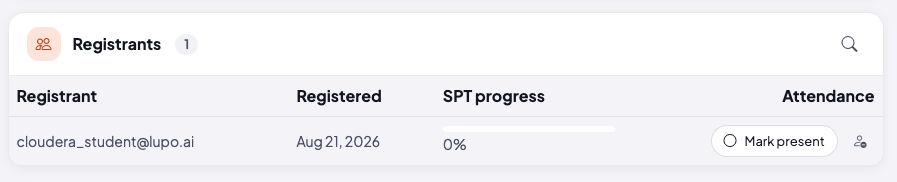
If the run has a linked self-paced course, a quicker read of how far each registrant has got in that course is on the session roster itself, in an SPT progress column.
What this doesn't do
Attendance here reflects what's been marked on each session's roster — a registrant nobody has marked present shows as Not marked and doesn't count as attended. Whether that attendance has completed the learner is decided by the run's pass mark — see Close out a class.
Common issues
A learner's attendance looks wrong. Check the specific session's roster — reports reflect whatever was marked there, so fix it at the source. If the session has been closed out, reopen it first.
I can't find percent complete. On an instructor-led course there isn't one. Look at the linked self-paced course's own reports, or the SPT progress column on the roster.
Where to go next
- Manage the roster — where attendance is actually recorded.
- Close out a class — how attendance turns into completion.
- Ask Lupo and your course — what's and isn't available to you and your learners on this course.