Welcome!
-
-
- Learn Home
- Core Concepts
- Companies and Departments
- Courses
- Course Status and Visibility
- Modules
- Video Activities
- Reading Activities
- Document Activities
- Enrolling People in a Course
- Bulk Enroll With CSV
- Roles in a Course
- How Progress Is Tracked
- Course Reports
- Knowledge Base Overview
- Libraries and Folders
- Uploading Content Items
- Library Visibility
- AI Agent per Library
- My Courses
- Platform People
-
- Project Structure Template
- Table of Contents (TOC)
- Content Folder
- Introduction to Markdown
- Markdown Basics
- Markdown Lists
- Markdown Links
- Markdown Images
- Markdown Code
- Markdown Tables
- Markdown Equations
- Markdown Videos
- Markdown Embedded HTML
- VS Code Snippets
- Introduction to Styles
- Framed Narrations
- Markdown Configuration
- Editor Setup
-
-
-
Premium Narrators
TL;DR; Switch the Choose voice type dropdown to Premium to unlock a smaller catalog of more lifelike voices. They sound better — especially on longer passages and anything customer-facing — at the cost of render time and, depending on your plan, minutes.
What Premium voices are
Premium narrators are a higher-quality tier of voices in Lupo. They're built on different speech models than the Standard voices and are noticeably better at:
- Prosody — the rise and fall of sentences sounds more natural.
- Pauses — commas, dashes, and paragraph breaks feel more organic.
- Long passages — sentences over 20 words don't flatten out the way they can on standard voices.
The trade-offs:
- Slower rendering. A video that takes 5 minutes on a Standard voice may take 10+ minutes on a Premium voice.
- Narrower language coverage. Standard voices cover every supported language. Premium voices cover fewer.
- Plan-dependent pricing. On some plans, Premium voices use a different minute budget. Check your plan or ask your admin before committing a long deck.
How to use a Premium voice
In the voice dialog:
- Click the Choose voice type dropdown and select Premium.
- The Choose a voice list updates to show only Premium voices.
- Pick one and confirm as usual.
Every other part of the dialog — subtitles, speed, email — works the same.
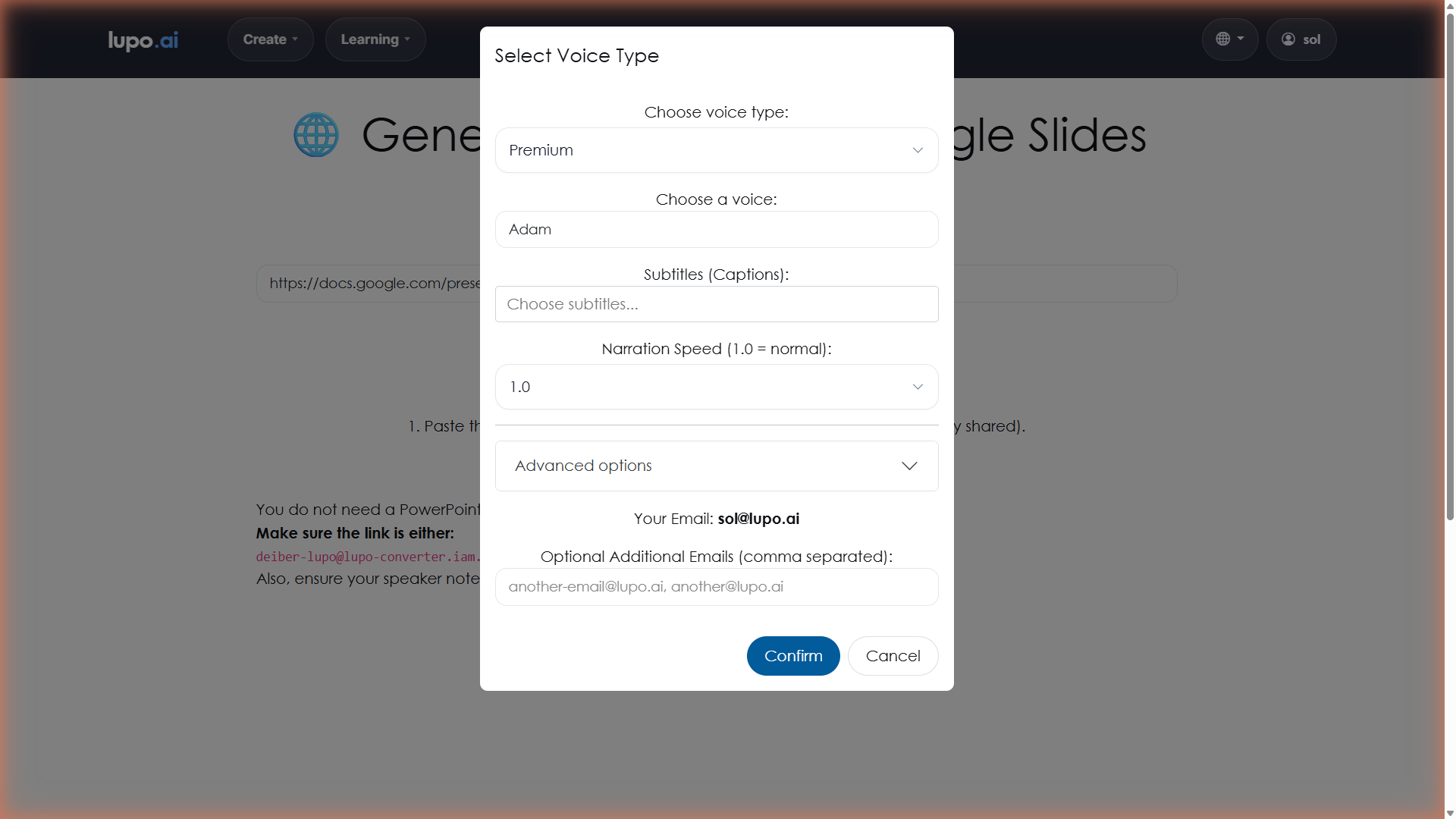
One thing that doesn't change: the Narration Speed range is 0.7 to 1.2 for Premium voices, the same as for every other voice type.
When Premium is worth it
Use Premium voices for:
- Customer-facing content. Anything a paying customer will watch — onboarding videos, product enablement, help center content — benefits the most.
- Executive presentations. Where production polish matters and listeners will notice anything that feels "AI-ish."
- Marketing-adjacent material. The kind of content where flat narration undermines the message.
- Long-form storytelling. When a slide's narration runs to five or six sentences, Premium voices stay natural much longer.
Stick with Standard voices for:
- Internal training. SOPs, onboarding decks, team enablement. Standard voices are plenty good, and rendering faster matters when you're iterating.
- Short updates. If the video is under a minute, the difference is hard to hear and the cost isn't worth it.
- High-volume production. If you're generating 20 videos a week for internal learners, Standard voices will save you time and minutes without anyone noticing.
What to do if you don't see Premium voices
If the dialog has no Choose voice type dropdown at all, your account has neither Premium nor Enterprise voices. Instead, a note at the bottom of the dialog says premium voices are available, with a Learn more about them link. If the dropdown is there but has no Premium option, your account includes Enterprise voices but not Premium.
In that case, contact your Lupo administrator or email help@lupo.ai to ask about enabling Premium voices for your organization.
Where to go next
- Premium Tutorial — a walkthrough of producing a full video with a Premium voice.
- Emotions — emotion tags are a Standard-voice feature; Premium voices ignore them.
- Translations — check which languages your Premium voices support before planning a multi-language project.