Welcome!
-
-
- Learn Home
- Core Concepts
- Companies and Departments
- Courses
- Course Status and Visibility
- Modules
- Video Activities
- Reading Activities
- Document Activities
- Enrolling People in a Course
- Bulk Enroll With CSV
- Roles in a Course
- How Progress Is Tracked
- Course Reports
- Knowledge Base Overview
- Libraries and Folders
- Uploading Content Items
- Library Visibility
- AI Agent per Library
- My Courses
- Platform People
-
- Project Structure Template
- Table of Contents (TOC)
- Content Folder
- Introduction to Markdown
- Markdown Basics
- Markdown Lists
- Markdown Links
- Markdown Images
- Markdown Code
- Markdown Tables
- Markdown Equations
- Markdown Videos
- Markdown Embedded HTML
- VS Code Snippets
- Introduction to Styles
- Framed Narrations
- Markdown Configuration
- Editor Setup
-
-
-
Emotions
TL;DR; You can change the tone of a specific slide by adding an inline emotion tag at the top of its speaker notes, like [[cheerful]] Welcome to the course. The narrator stays the same — only the mood of that passage changes. This works with the Standard voices that support styles — nine of the English (US) voices, plus a handful in other languages; not every voice has every emotion. Premium voices ignore the tag, and it still isn't read aloud.
Picking a single narrator for a video is the right starting point, but sometimes a particular slide needs a different feel. The congratulations slide should sound warm. The compliance warning should sound serious. The CTA at the end should sound upbeat.
Inline emotion tags are how you do that without switching voices mid-video.
How to use an emotion tag
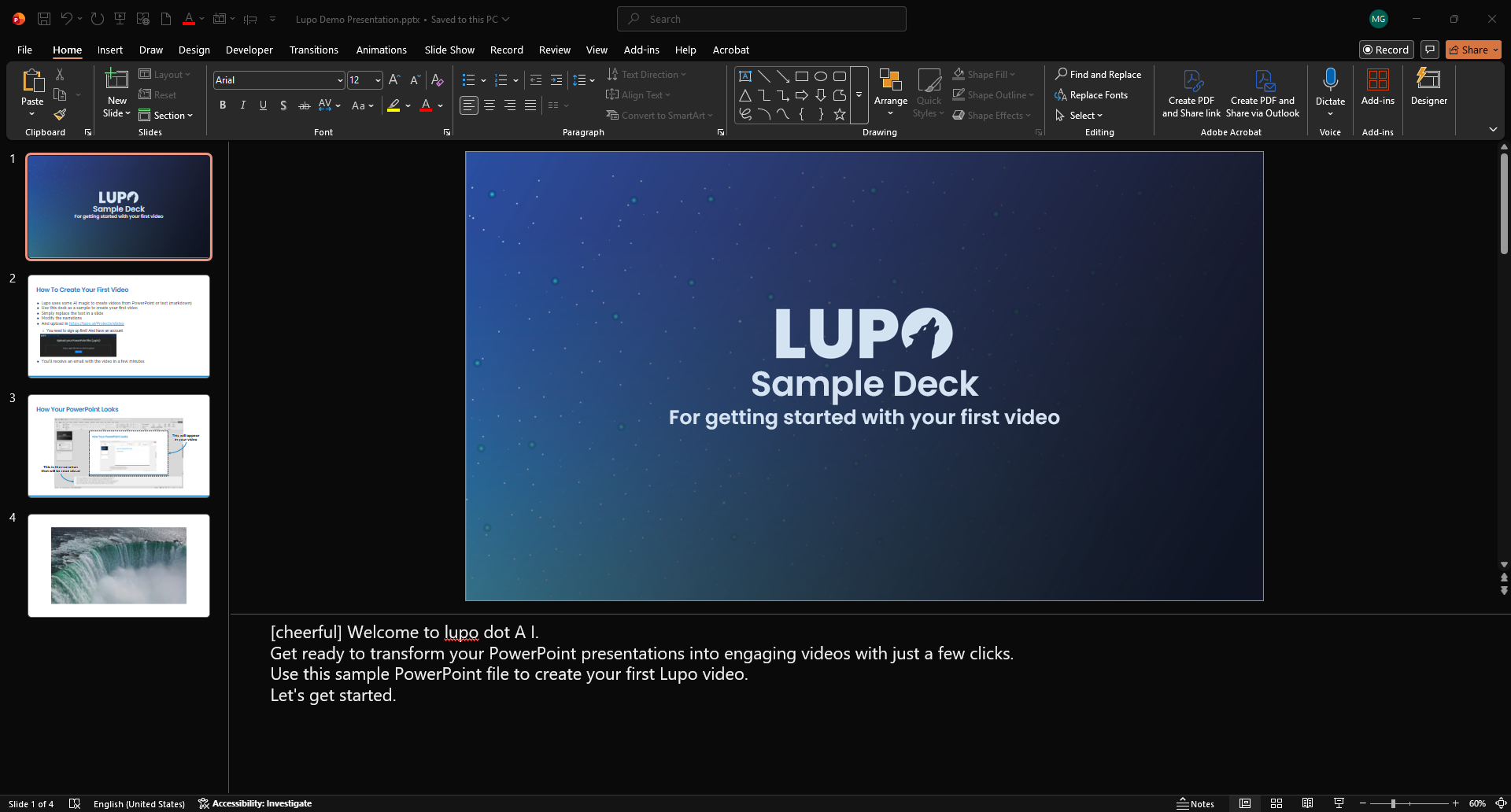
Open your PowerPoint's speaker notes for the slide you want to change. At the very beginning of the notes — before the first word of narration — type a double-bracketed tag with the name of the emotion:
[[cheerful]] Welcome to our universe, a vast and wondrous place full of mysteries and surprises.
The tag controls the tone for that slide's narration. The next slide's notes revert to the default tone unless you add another tag.
A few important rules:
- Put the tag at the start of the notes. Lupo reads it as a directive, not as text to narrate. It won't appear in the audio.
- One tag per paragraph. A tag sets the tone for the paragraph of notes it opens. A second tag in the same paragraph is stripped and ignored; a tag opening a later paragraph sets the tone for that paragraph instead.
- Emotions are voice-specific. Not every voice supports every emotion, and many voices support none at all. If the voice doesn't have the one you asked for, that slide simply plays in the voice's default tone.
The common emotions
These are the emotions you'll use most. In English (US), nine of the Standard voices support styles — Aria, Davis, Guy, Jane, Jason, Jenny, Nancy, Sara and Tony. The other eleven (Amber, Ashley, Brandon, Christopher, Cora, Eric, Jacob, Michelle, Monica, Roger and Steffan) have no styles at all, so a tag has no effect with them.
These five work with all nine:
- cheerful — upbeat and warm. Good for welcomes, congratulations, and positive CTAs.
- friendly — conversational and approachable. The default feel for most training.
- excited — higher energy. Good for product reveals and announcements.
- hopeful — gentle and forward-looking. Good for vision statements.
- sad — slower and softer. Rarely appropriate for training, but useful in storytelling.
These three exist on only a few voices:
- chat — casual and informal. Designed for explainer-style narration. Aria, Davis and Jenny only.
- customerservice — polite and professional. Designed for service-scenario content. Aria and Jenny only.
- empathetic — calm and understanding. Good for sensitive topics like HR conversations or customer service. Aria only.
There is no serious style on any voice. For compliance warnings and anything consequential, leave the tag off and let the default tone carry it — it is already measured.
Every one of the nine also supports angry, shouting, terrified, unfriendly and whispering, which are rarely right for training. Outside English (US) the choice is narrower: cheerful works with Sonia and Ryan (English UK), Conrad (German), Jorge (Spanish, Mexico), Denise and Henri (French), Isabella (Italian) and Nanami (Japanese); sad with Sonia, Denise and Henri; chat with Ryan, Jorge, Isabella and Nanami; customerservice with Nanami; and Francisca (Portuguese, Brazil) has calm. If you want to experiment, start with the five above and expand from there.
When to use emotions (and when not to)
Use them when:
- A specific slide genuinely needs a different tone to land.
- You're telling a story across slides and one "beat" needs a mood shift.
- You're producing a higher-production-value piece where flat narration would feel off.
Don't overdo it. An emotion tag on every slide makes the video feel theatrical and the narrator sound unstable. The baseline should be "no tag, default tone," with emotions used sparingly — maybe on 10–20% of the slides in a typical deck.
Troubleshooting
The tag is showing up in the narration. You probably used a single bracket ([cheerful]) instead of double brackets ([[cheerful]]). The double brackets are the marker.
Nothing changed. The voice you picked may not support that emotion — or any emotion: only nine of the English (US) Standard voices have styles, and Premium voices ignore the tag entirely. Try one of the nine voices listed above with an emotion they all share (like cheerful or friendly).
The emotion is too strong. Pick a milder one (friendly instead of cheerful, for example) or remove the tag entirely and let the default tone handle it.
Where to go next
- Narrators — pick the base voice before layering emotions on top.
- Premium Narrators — more natural delivery, but Premium voices don't accept emotion tags.